What AI frame interpolation does
Frame interpolation fills the gap between two frames with a new one. Simple video players and editors do this by blending: they fade frame A into frame B, which produces ghosted double images on anything that moves. AI frame interpolation works differently. The model estimates optical flow, meaning the direction and distance every small region of the picture travels between the two frames, then warps both frames to the halfway point and merges them. The result is a real in-between picture where a moving arm, car or camera pan sits exactly where it would have been at that moment.
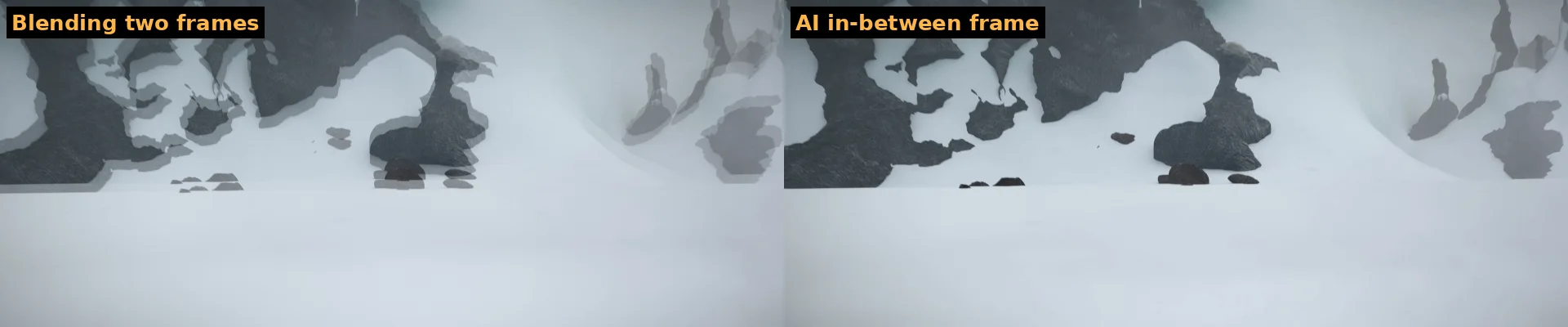
We measured it on test footage by removing every second frame and asking the model to recreate it. The AI frames matched the real missing frames far better than blending (29.2 dB versus 24.7 dB PSNR on a fast-moving scene), and the browser version gives the same result as the reference implementation of the model.
How to use frame interpolation online
- Drop a video into the box above. MP4, MOV, WebM and MKV all work if your browser can decode them.
- "Smooth 60 FPS" is already selected. The panel shows your source frame rate and the result, for example 30 → 60 fps or 24 → 48 fps.
- Click Preview 3 seconds. Watch the short clip: motion should look fluid with no ghosting. The panel also estimates the time for the whole video on your computer.
- Click Enhance full video, keep the tab open, then download the MP4. The audio track is copied over unchanged.
When frame interpolation helps
- Gameplay and screen recordings captured at 30 fps look closer to the 60 fps you saw while playing.
- Phone videos and vlogs get smoother pans and walking shots.
- Slow motion: doubling the frames lets you slow a clip to 50% in any editor without the stutter of repeated frames.
- Old footage at 24–25 fps can be made smoother for TVs and monitors that show motion judder.
- Stop-motion and animation can be smoothed, although the extra frames change the intended look, so preview first.
Film purists prefer 24 fps for movies; the "soap opera effect" of interpolated film is a matter of taste. For sports, games, travel clips and anything with a moving camera, most people find 60 fps clearly better.
Frame interpolation versus other ways to change frame rate
| Method | How it makes new frames | Result on motion |
|---|---|---|
| Frame duplication | Repeats each frame | Same stutter, file is just bigger |
| Frame blending | Fades two frames together | Ghosted double images |
| Classic optical flow (editors) | Hand-tuned motion estimation | Good on slow motion, tears on complex scenes |
| AI frame interpolation (this tool) | Neural network trained on real video | Clean motion, small artifacts only on very fast or occluded objects |
Speed and limits
Each new frame needs one pass of the model at full resolution, so speed depends on your graphics card and the video size. On an NVIDIA RTX 4060 Ti in Chrome we measured about 11 source frames per second at 720p and about 6 at 1080p, including decoding and encoding. One minute of 30 fps 1080p video therefore takes about five minutes; integrated laptop graphics take several times longer. Videos larger than 1080p are scaled to 1080p, because interpolating 4K frames needs more graphics memory than browsers allow. Browsers without WebGPU can still run the model on the processor, but it is 10–20 times slower and only practical for very short clips.
Scene cuts are handled automatically: when two neighbouring frames are clearly different shots, the tool repeats a real frame instead of morphing them together. Fast spinning wheels, fingers in front of a face and similar occlusions can still show brief warping, which is a limitation of every interpolation model available today.
Tips for smooth results
- Interpolate the original recording, not a copy that has been compressed again by a messaging app.
- If you also want a higher resolution, run the video upscaler first and frame interpolation second, or keep the frame rate step at 1080p for speed.
- For slow motion, interpolate once to 60 fps, then set the clip to 50% speed in your editor.
- Very shaky handheld clips benefit less; stabilise them first if your editor can.
Want sharper pictures rather than smoother motion? Go back to the video quality enhancer and choose "Enhance & upscale".